


Everyone's talking about git worktrees + Claude Code for parallel development. We love it, but we needed something more. So, we added dynamic service profiles that let you run only what you need locally while using Azure resources for everything else. Meshing that with Git worktrees and Claude Code gives us just the right hybrid approach to keep the dev machines singing and the costs down.
Worktrees and Claude Code are a match made in Heaven
If you're a software developer and you've jumped on the AI coding train, you've probably seen the articles...
"Git Worktrees + Claude Code = Parallel Feature Development!"
"Work on 3 features simultaneously with worktrees!"
"The future of AI-assisted development!"
If not, you might want to get up to speed. Claude Code alone has the potential to turn you into a coding machine. Pumping out features, literally, while you sleep.
The problem arises when you get so efficient at coding that you want to start generating 2, 3, 4 features at a time. Git's single-working-directory becomes a real bottleneck. Worktrees solve that.
Once we got rolling down the track, we figured it was time to try it out for ourselves. We set up Claude Code. We setup worktrees. We started working on multiple features in parallel. It was fun! Like, truly. It hasn't been fun in a while. Now, it's fun again.
All that being said, I'm not here to talk about worktrees and even Claude Code. I'm here to talk about the next evolution of Parallel Development Workflows... Dynamic Hybrid Azure Parallel Development Workflows.
This all started when I saw Boris Cherny's 13-step Claude Code setup on Reddit. It changed my metaphorical life. Go read it if you haven't... Claude Code Creator's Setup
The Memory Wall
When developing real-world solutions, worktrees hit a wall. Memory.
Here's what those worktree articles don't mention: You still need to run your entire stack for each worktree.
Our Azure-native stack includes:
• UI (256MB)
• API backend (512MB)
• Python pipeline (6GB)
• Python service (1.5GB)
• DB (2GB)
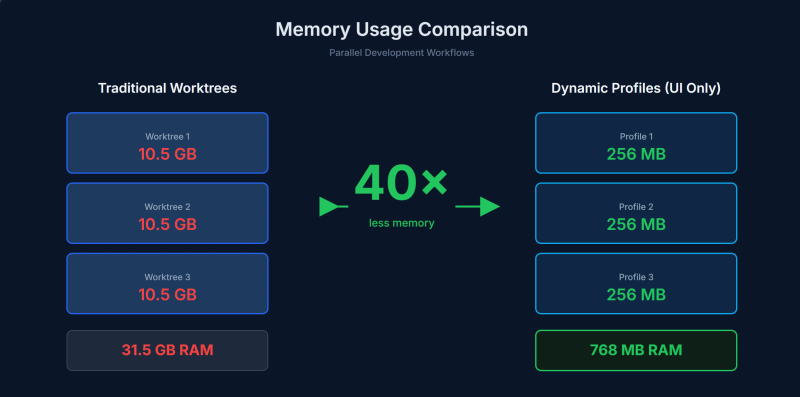
Total per worktree: ~10.5GB RAM
That starts to add up quickly.
How It All Began
As a Microsoft ISV, we're part of the Microsoft for Startups program. This gives us access to Azure credits and technical support that would otherwise be cost-prohibitive for an early-stage company.
Oh, and we get to build on enterprise-grade infrastructure - Cosmos DB, Service Bus, Storage, Container Apps - essentially for free during our growth phase. That's a huge advantage.
But we were only using Azure as a deployment target. A demo environment.
Time to take the next step and mature into a hybrid approach. Let's start using Azure CosmosDB for everything. No more local databases. Let's implement a messaging system to help coordinate our workflows. Azure Blob Storage for the mountains of files.
After combining parallel development workflows with our cloud development setup, we start spinning up those worktrees.
And... that's when we hit the memory wall.
The Solution: Dynamic Service Profiles
We asked ourselves: What if each worktree could choose what runs locally?
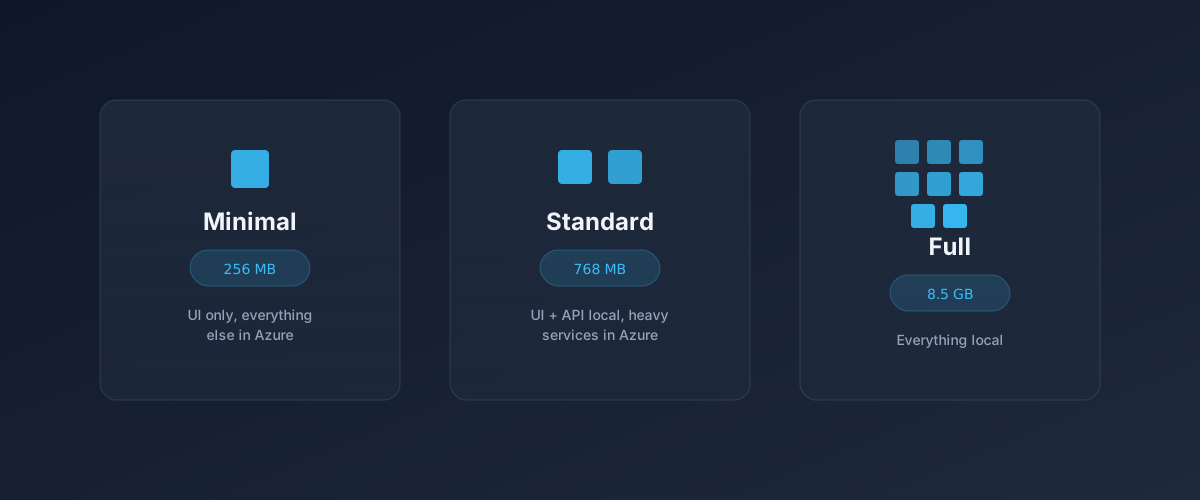
The answer was service profiles - three configurations that let you run only what you need:
**Minimal Profile (256MB)**
Just the UI runs locally. Everything else (API, databases, pipelines) uses Azure DEV resources.
Perfect for: UI work, bug fixes, styling
**Standard Profile (768MB)**
UI + API run locally. Heavy services stay in Azure.
Perfect for: API development, debugging backend logic
**Full Profile (8.5GB)**
Everything local. Rarely needed.
Perfect for: Offline work, performance profiling
The magic? You can switch profiles mid-development. Working on UI? Minimal. Need to debug an API call? Switch to standard. Back to UI? Switch back. The automation scripts handle everything.
How It Works
We built scripts that automate the entire workflow:
1. Create a git worktree for your feature
2. Select a service profile (or let it default to minimal)
3. The script generates the right environment configuration
4. Docker Compose starts only the containers you need
5. Everything else points to shared Azure DEV resources
Example:
/start-feature hierarchy-filters --profile minimal
Creates a worktree, spins up just the UI (256MB), and you're coding against real Azure Cosmos DB, Service Bus, and Storage.
Need to debug the API mid-feature? One command:
/switch-profile standard
Adds the API container locally. Everything else stays unchanged.
The Results
10x-40x
less memory per feature
3x
faster delivery
5 min
onboarding time
Why This Matters
Most developers still treat the cloud as a deployment target, not a development resource.
This approach flips that. Use cloud development resources as shared infrastructure. Run only what you're actively coding locally. Switch dynamically based on what you're debugging.
Utilizing the benefits of something like the Microsoft ISV program is very practical. You're already getting Azure credits. Use them for development, not just demos.
The Bigger Picture
AI coding tools like Claude Code are making us so much faster and more efficient at writing features. Git worktrees let us work on multiple features in parallel.
But the traditional "run everything locally" model can't keep up. It requires too much memory, too much setup, and creates parity problems between local and cloud environments.
The solution isn't to go back to serial development. It's to rethink what "local development" means:
• Run only what you need locally (selective, dynamic)
• Use real cloud resources for everything else (cloud)
• Switch profiles based on what you're debugging (automation)
Result: Sustainable parallel development that actually scales.